
Can you run a weekend yoga retreat in CoreBookings — for example, starting Friday evening and finishing Sunday afternoon? Yes. The best setup depends on whether clients buy one retreat package or pay per session.
Overview #
CoreBookings supports special events through:
- Class events — booked with passes (ideal for a multi-day retreat package)
- Workshop events — booked with a separate workshop ticket via Stripe checkout
There is no separate “course” feature. Use a dedicated retreat pass plus scheduled class sessions, or use workshops for paid ticketed events.
Choose your setup #
Multi-session weekend retreat (recommended): Clients buy one retreat pass and book each session (Friday night, Saturday, Sunday) as regular Class events.
Paid workshop tickets: Each session is a Workshop with its own ticket price. Clients pay per session through Stripe checkout. Regular class passes do not apply to workshops.
Multi-session retreat with a dedicated pass #
Use this approach when clients pay once for the full weekend and attend multiple scheduled sessions.
- Go to Settings → Class Types and create a session type such as Weekend Yoga Retreat.
- Go to Settings → Passes and create a retreat pass (for example, a 4-visit pack for four sessions across the weekend). Set the price and visibility for your retreat.
- If your plan includes Allowed class types on passes, restrict the retreat pass to Weekend Yoga Retreat so it cannot be used on regular weekly classes.
- Go to Class Schedule and click Add New Class for each retreat session (Friday evening, Saturday morning, and so on).
- Leave Event Type as Class, choose your retreat Session Type, and set date, time, teacher, and room for each session.
- Clients purchase the retreat pass, then book into each session on your schedule.
Use Create & add another in the Create Class dialog to speed up adding multiple sessions with similar details.
Paid workshop sessions #
Use workshops for masterclasses, intensives, or events where clients buy a ticket per session rather than using a class pass.
- Go to Class Schedule and click Add New Class.
- Set Event Type to Workshop.
- Enter a Workshop Price ($) (must be greater than $0.00).
- Choose a Session Type, then set date, time, teacher, room, and capacity.
- Click Create Class.
Clients see a Workshop badge on the schedule and pay via Stripe checkout to book. Staff adding clients from class details use Pay & Book for workshop checkout — class passes are not offered for workshops.
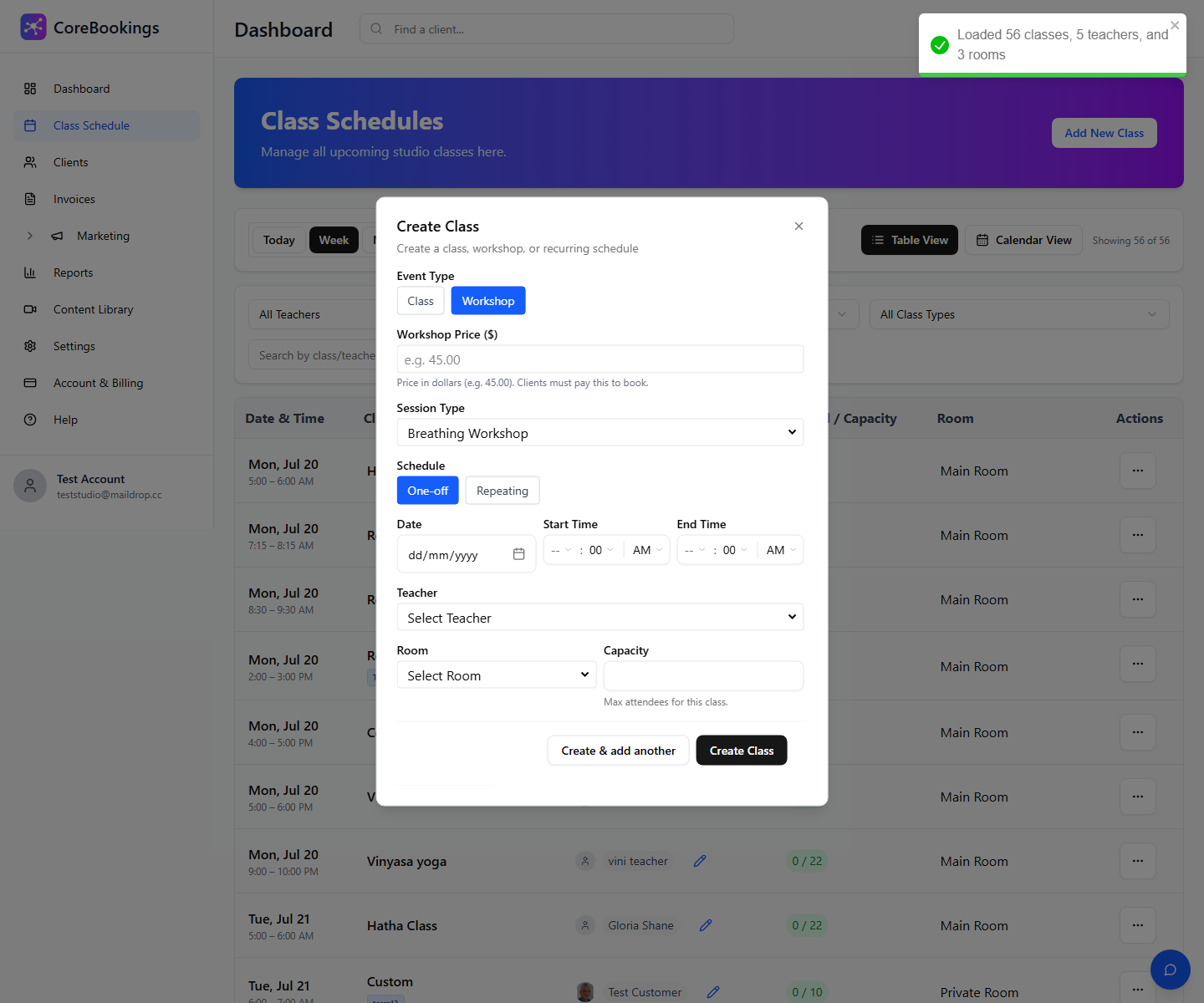
For a full-weekend ticket sold as one workshop listing, create a single one-off workshop session with the total retreat price. For separate Friday, Saturday, and Sunday tickets, create one workshop per session.
Before you start #
- Connect Stripe under Settings → Payments before selling passes or workshop tickets online.
- Create your room or location first if the retreat uses a dedicated space. See How to create a room or location.
- Workshops cannot be set to $0 in the schedule editor. Use a regular Class event if the session should be free or pass-based only.
Related help #
- Is CoreBookings compatible with Square payments?
- How to run in-studio and online classes at the same time
- How to start taking client bookings
Need help planning your retreat setup? Email support@kriya.com.au.


